Document composition

Contracts, letters and statements, composed from templates.

TinyRenderer is a document composition service with a management console and a template Studio. Design a template once, bind it to your data, and the service produces the finished document as PDF, HTML, Word, Excel or email, the same way every time.

Access is by invitation: ask us and we send you registry credentials. Free during the private beta.

PDF, HTML, Word, Excel, emailnative Rust layout and PDF engineexact decimal amountsone tenant or many

One template, every format.

Write the document once. The service resolves your data against it the same way for every output, so a value reads the same in the PDF, the Word file, the spreadsheet and the email.

1 · Design

Author in Studio

Studio has Data, Compose and Preview modes. Drag blocks and fields into place: text, fixed and repeated tables, conditions, images, charts, headers and footers, and calculated fields such as sums, counts, averages and row formulas.

Template library with revision history; restore a past revision as a new draft
2 · Bind

Connect your data

A template owns a reusable data contract and can bind reusable datasets and data sources. Import a schema, keep named sample scenarios, and check the result against them. Amounts stay exact decimals from input to output.

Contracts, datasets and sources are managed in the console
3 · Generate

Preview, then produce

Preview resolves your sample data at once. A durable output is requested deliberately: a PDF proof, HTML, Word (DOCX), Excel (XLSX) or email, stored with its identity and exact bytes.

Layout and PDF by a native Rust engine
4 · Approve

Review and publish

A reviewer approves the stored PDF proof, and download keeps those exact bytes. A publisher publishes the template. Changing the sample data invalidates earlier proofs, so an approval always matches what was reviewed.

Separate designer, reviewer and publisher roles
PDFHTMLDOCXXLSXEmailMore than 110 languages and regionsExact decimal amounts

For the people who make documents, and the systems that ask for them.

Roles keep authoring, generating, approving and publishing apart.

Template designersBuild and maintain contracts, letters and statements visually in Studio, with the data fields, tables and calculations they need.
OperatorsLoad data into an existing template and generate the output, without being able to change the template itself.
Reviewers and publishersApprove PDF proofs and data contracts, and publish templates. These are separate roles from designing.
DevelopersCall the HTTP API from your own systems: seal the input, render, download. An OpenAPI 3.1 reference is served by the service.
AdministratorsChoose one tenant or many, give people access with roles, and sign people in with built-in accounts or your identity provider.
Teams that issue documentsLending agreements, account statements, loan decision letters, invoices and welcome packs are all in the included examples.
Eleven example templates to start from.

The Studio gallery includes them. Open a sample PDF, or use one to create an editable copy in your own workspace.

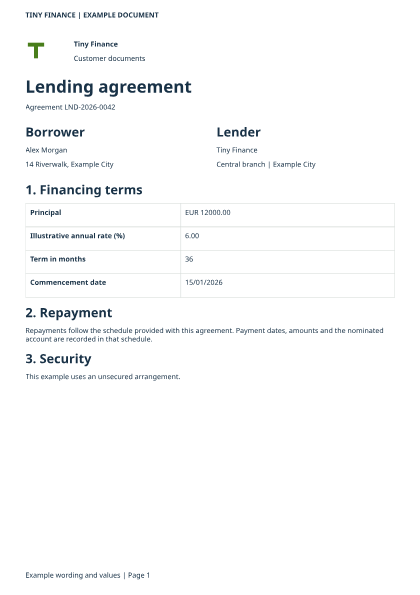
Lending agreement: a page of the example output
Lending agreementPortrait, conditional security wording
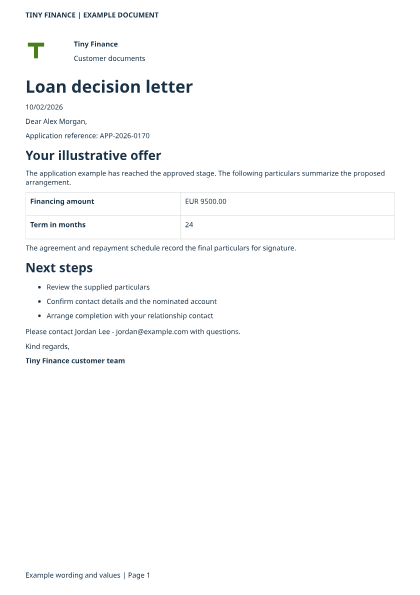
Loan decision letter: a page of the example output
Loan decision letterPersonalized, approved and pending samples
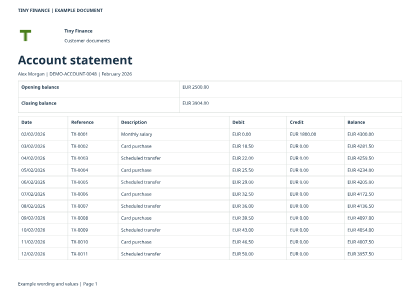
Account statement: a page of the example output
Account statementLandscape, running balances and totals
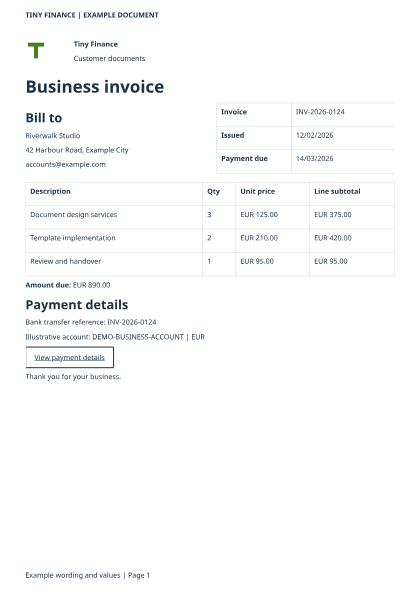
Business invoice: a page of the example output
Business invoiceImage and text, quantity-by-price totals
Installment repayment planLending agreementAccount-opening agreementAccount statementBusiness invoiceLoan decision letterCustomer portfolio reportProduct factsheetService agreementCustomer welcome packRegional performance

Wording, organizations, people, references and financial values in the examples are illustrative.

Everything the console does, over HTTP.

Your systems send the data; the service returns the document. Templates, snapshots, jobs and artifacts all belong to the signed-in tenant.

curl --fail-with-body --header @auth.headers --json @snapshot.json \
  "$RENDERER_URL/v1/templates/$TEMPLATE_ID/snapshots"
  • Seal the input values as a snapshot of a saved template revision; the answer carries the snapshot id to render from.
  • Live checks: POST /v1/preview/pdf lays out a project and its sample data as a PDF in the same response. Nothing is saved and no job is queued.
  • The service serves an OpenAPI 3.1 reference at GET /v1/openapi to callers who may read templates.
  • Edits use strong ETags, so two people changing one draft get a clear conflict, not a silent overwrite.
  • Automation signs in with an access token from your identity provider; the roles in the token decide what it may do.

Sign-in, roles and tenants.

PostgreSQL is the only database.

One tenant or manyChosen once for the installation. Single-tenant (the default) serves one company and the console never mentions a tenant; multi-tenant adds a tenant switcher and email-first sign-in.
Built-in accounts or your identity providerSign in with accounts an administrator creates, or through OpenID Connect.
Roles that match the workAdmin, designer, operator, viewer, reviewer and publisher, combined as needed. A designer cannot approve a proof or publish; a reviewer cannot edit a template.
Tenant-scoped, immutable recordsTemplates, snapshots and stored outputs belong to a tenant. A caller cannot pick another tenant by naming it in a request.

What is in the private beta.

What the service does today.

In the beta
  • Template Studio and management console
  • Template library, history and restore
  • Reusable contracts, datasets and sources
  • Tables, charts, conditions, images
  • PDF proof with approval, HTML, DOCX, XLSX, email
  • Built-in sign-in, OIDC sign-in, roles, tenants
  • Container images and a Helm chart

How to try it.

There is no public image yet. The private beta is by invitation, and it is free: ask, and we send you registry credentials and the release bundle.

docker compose -f compose.runtime.yaml config --quiet
docker compose -f compose.runtime.yaml run --rm migrate

docker compose -f compose.runtime.yaml run --rm bootstrap identities create \
  --email admin@example.com --password-file /run/secrets/initial_password
docker compose -f compose.runtime.yaml run --rm bootstrap identities grant-membership \
  --email admin@example.com --customer-id example-company --roles admin
docker compose -f compose.runtime.yaml up -d api worker pdf-renderer

From the release bundle's compose.runtime.yaml, after the database and image settings are filled in.

  1. Ask for access. Write to hello@tinyfactory.ai. We send registry credentials and the release bundle.
  2. Bring PostgreSQL. A TLS-enabled database with a runtime role and a separate migration owner role. The API and worker share one artifact volume.
  3. Run the images. Migrate, apply the supplied runtime grants, create the first account and start the API, worker and PDF service, as above.
  4. Open the console behind your HTTPS proxy, sign in, choose Examples and press Use on a template. Choose Preview to see it filled with sample data.

See your own document come out of a template.

Free during the private beta. Access is by invitation.